Moultrie Game Cameras Review: Edge 2 Pro & Edge 2
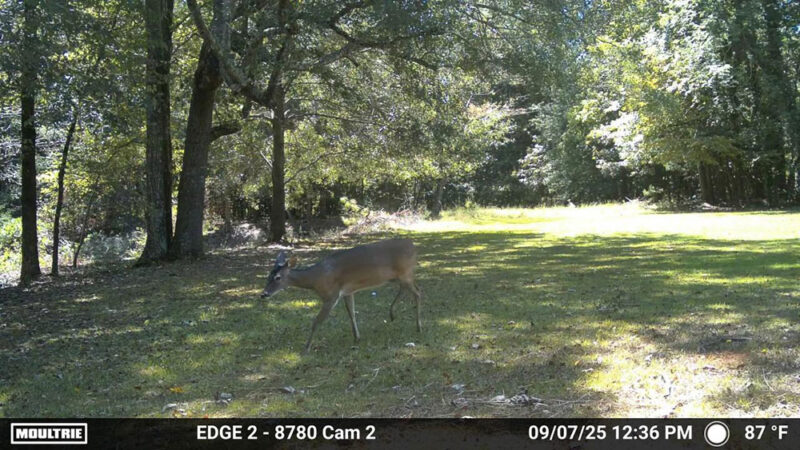
Deer hunting has changed a lot since I started in the 80s. Back then, I owned one gun, a Remington 1100 in 12 gauge. I was also usually plopped down in a spot by my father, who enjoyed deer hunting but didn’t take it seriously. In his defense, he grew up in a time when deer populations were very low.
By the time I could drive, I got serious about deer hunting, learning everything I could through magazines and books (there was information before the Internet). It was right about that time when the first trail camera came out. These cameras had limited range on both the camera and activation, and used a bright flash for night pictures. They also used film, meaning it had to be pulled and developed to find out what had been captured. You might have to wait a week for photos.
Despite these limitations, I wanted one. Unfortunately, I didn’t have the money and dad didn’t see the point. He ultimately changed his mind about trail cameras, especially once they became digital, but he stood firm at the time.
I eventually obtained a film trail camera, a few in fact, upgrading to digital later. Over the years, I have used Bushnell, Cuddleback and Moultrie game cameras to great results. Until I got my hands on two Moultrie game cameras—Edge 2 Pro and an Edge 2—however, I hadn’t used a cellular game camera. It didn’t take long to see the benefits.
Moultrie Game Cameras
Moultrie brought its first game camera to the market in 1998. Since then, technology has jumped in leaps and bounds, starting with game cameras designed specifically for hunters as a single unit. This was followed by digital in 2004, cellular in 2007 and high definition trail cameras that produced both photos and video in 2009; Moultrie put out the first cellular game camera.
Moultrie was also the first company to replace moving camera parts with fixed PIR, IR LEDs and fixed lenses in 2016 with the P180i. The company used three lens to create a 180-degree panoramic photo. This trail camera had good battery life on AA batteries, along with a fast picture detection with a huge detection zone. The picture quality was also excellent in the daylight, though it had some issues with night photography and video.
Moultrie has continued producing a variety of hunting products, including game cameras, with the next version being the Edge 3 Pro, integrating AI into the world of taking pictures of game. This doesn’t mean, however, that the Edge 2 Pro, or even the Edge 2, is obsolete, as both have numerous features that benefit hunters. The Edge 2 Pro also uses AI, and there is already an Edge 3 available.
Set Up & Activation
Using the Moultrie Edge 2 Pro camera, along with many of the company’s other products, requires downloading the Moultrie Mobile App. The app helps set up the camera, provides access to its features and allows viewing the images. Even better, the app is extremely easy to use.
All you have to do is scan the QR code, located inside the door. This takes you to the set up page. Here, you name the device, choose the plan and enter payment options. Just follow the directions in the app. It is very intuitive.
Then, simply attached it to the chosen tree via the included straps. Those needing more security can purchase a locking box or a cable. The Moultrie Edge 2 Pro even has a Live Aim, where you can view what the camera sees, via Bluetooth, to ensure proper location and mounting. After that, you decide whether you want video or photos, number of photos and sensitivity. The app even allows users to set up a delay between photos and videos and upload frequency (I have mine upload immediately).
What’s even nicer about the Moultrie Edge 2 Pro is that it allows for the eliminating of detection zones, letting you wipe out that moving tuft of grass that keeps randomly activating the camera. It also comes with Smart Capture, which uses AI to take pictures of desired species. These include buck, doe, turkey, hog, vehicle and person. It even has GPS for always knowing where the camera is located. And of course it puts time and temperature on the images and video.
The Edge 2 has many of the features of the Pro, fast trigger speed, easy setup, 100-feet detection and flash, and high-res images and video. The Pro is just a little faster and higher resolution, and it includes Live Aim and Smart Capture. Those extra features, of course, bring a higher price. It does, however, work just as well with the Moultrie Mobile app, providing excellent detection, imaging and viewing for about $40 less.
Running the Moultrie Game Cameras
I obtained the Moultrie Edge 2 Pro and Edge 2 in early July, so I first set them up more for security than game. The Edge 2 sets up like other digital cameras. I attached it to a tree and determined the device and capture settings—photo, number of photos, sensitivity, etc. I simply attached it to a tree and determined the device and capture settings—photo, number of photos, sensitivity, etc. Using the Live Aim on the Moultrie Edge 2 Pro made setting up extremely easy, letting me readjust the zone to my exact specifications for coverage.
I started receiving images into the app shortly after setup. From there, I played with the settings, including On Demand, which tells the camera to immediately take a photo or video. This is a neat function that I’ve used many times, including right after notification of images. It is one of the neatest features.
Other interesting app features include battery power, signal strength and sharing. After moving the Edge 2 to a buddy’s, in hopes of catching photos of a gray-phase gobbler, I shared the camera’s content with him. All he had to do was download the app, register and go to Shared Galleries. It took longer to figure out that the images and videos were in Shared Galleries than I’d like to admit.
The only real issue I had was with Notifications. I gave permissions in the phone and on the app to have the cameras notify me when a photo was taken. However, it wasn’t working. A phone call with a really nice lady in Moultrie customer service got it up and running. She explained the issue, but it was a bit technical and I only cared about the results.
Nice Little Features
There is a whole lot to like about the Moultrie Edge 2 and Edge 2 Pro game cameras. They are extremely easy to set up and use. The picture quality, as well as video, is excellent, especially during the day. Night images are OK, but the IR flash blows up the image a little, especially if the target if near the camera; I kind of like how the video looks. One thing that is really neat is Colorized – Beta. Some night images come out with some color instead of black and white. It is not amazing color, but green in trees and brown on deer shows up. It is muted but it’s there.
The On Demand feature is beyond cool. You can be sitting in the house and tell the camera to take a photo or shoot a video just to see if something might be lurking just out of detection range. Both devices also have Time-lapse and Scheduler modes.
Time-lapse sets the cameras to take photo at specific intervals. These intervals start at one minute and end at 24 hours, with lots of other intervals in between. The Schedule Mode sets the cameras to only take photos during desired times, such as only during the day or even certain days.
Depending on how it is set up, motion activation can be included or eliminated. The Time-lapse/Schedule works well for large areas, such as fields, where distant motion might not activate the camera. However, keep in mind that these settings can quickly use up coverage and battery power.
It is obvious that the Edge 2 Pro beats out the Edge 2. Detection and activation speed is faster and the Live Aim ensures placement is correct. The Smart Capture also seems really good for targeting specific animals or types of animals, such as bucks. I don’t know how well it works, though, as I didn’t have good enough location to test that feature. This feature could make real difference when planning hunts without having to disturb areas with boots on the ground.
Now, most of the other features are close enough between the devices to not make a real difference. That is where it comes down to price. Those that only care about getting photos and videos sent to devices might want to consider saving the $40. However, I kind of look at it like a Woodrow Call moment, “It’s better to have it and not need it than to need it and not have it.” In fact, next time I might go with the Moultrie Edge 3 Pro.
Power Sources
Moultrie game cameras run on AA batteries, and they run for quite a while. Still, using AA batteries means that batteries are being thrown away fairly regular. It also means a regular expense, as 16 AA batteries aren’t cheap. Another option is the Moultrie Power Mag+ II.
This rechargeable battery pack provides enough power to run Moultrie game cameras (Edge series) for a few months, even in cold weather. The app even provides the battery percent, so users can plan when to swap or pull and charge. Even better, the Power Mag+ II is compatible with the Moultrie Solar Power Packs, which keeps the game cameras running continuously. Who knows how long it could stay active if all three are gotten together?